Most creators think AI video quality is a model problem.
It usually isn't.
The difference between an amateur-looking AI video and a cinematic shot rarely comes from changing models.
It comes from changing direction.
Most creators describe what they want to see.
Professional creators describe how the shot should be filmed.
"A woman walking through a park" is a description.
"A handheld 35mm follow shot tracking a woman through fallen autumn leaves during golden hour, shallow depth of field, natural ambient sound, slow pacing" is direction.
The first tells the AI what exists.
The second tells the AI how to see it.
That difference is what separates generic output from cinematic storytelling.
Whether you're creating advertisements, UGC content, product videos, social media campaigns, or AI-native films, every compelling shot is built from the same six creative layers.
Understanding these layers is one of the fastest ways to improve the quality of your AI-generated videos.
Why Most AI Videos Look Generic
Most AI-generated videos fail for one reason:
They focus on subjects.
They ignore filmmaking.
Creators spend all their effort describing:
The person
The product
The location
But very little effort describing:
The camera
The lighting
The mood
The movement
The result is technically correct footage that feels emotionally flat.
Professional filmmakers think differently.
Before they think about a character, they think about perspective.
Before they think about action, they think about framing.
Before they think about dialogue, they think about emotion.
The same principles apply to AI filmmaking.
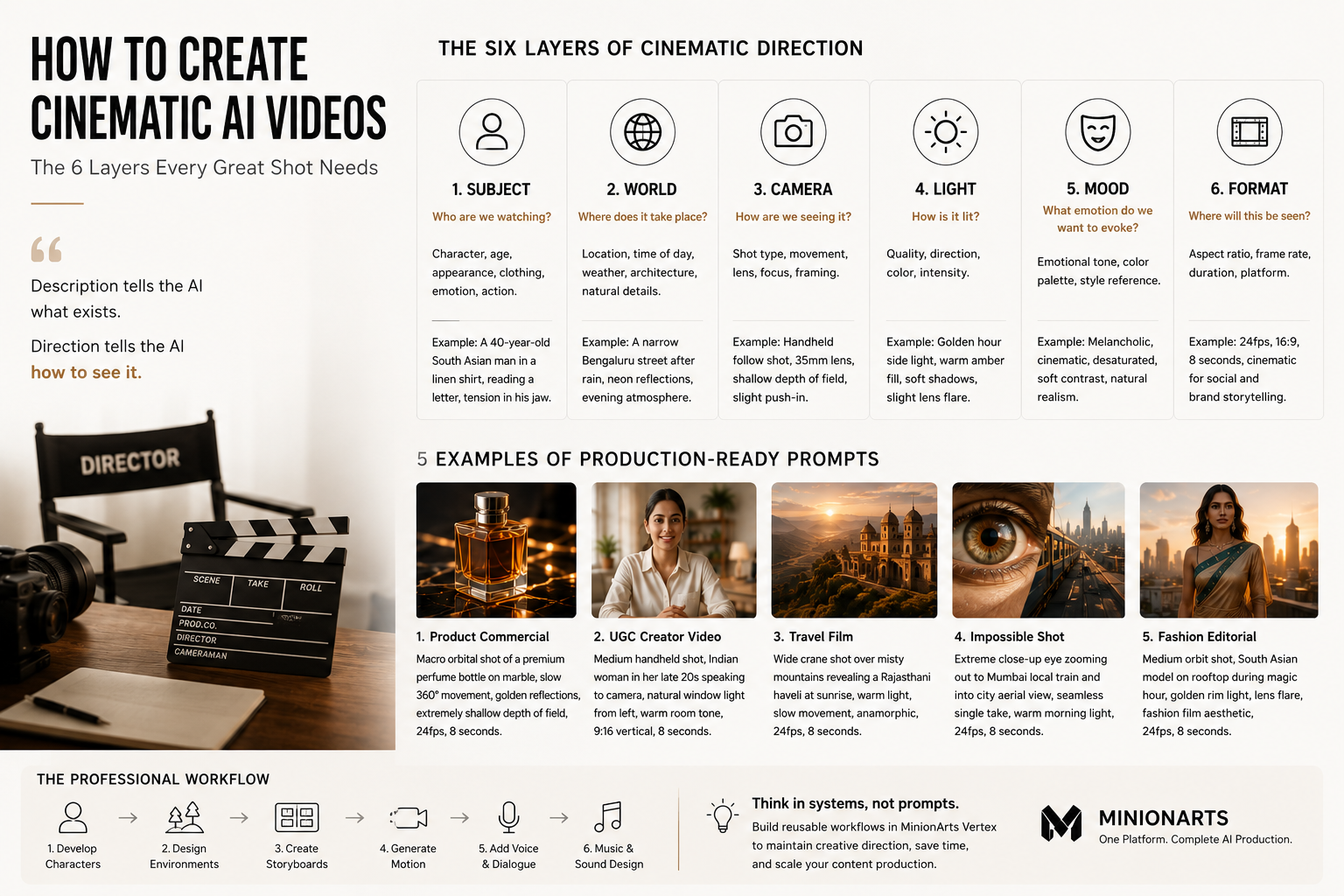
The Six Layers of Cinematic Direction
Every cinematic shot can be broken into six creative layers.
Think of these as instructions given to a virtual cinematographer.
Layer 1: Subject
The first question is simple:
Who are we watching?
Define the subject clearly.
Include:
Age
Appearance
Clothing
Emotional state
Action
The more specific the subject, the easier it becomes for the model to maintain visual consistency.
Weak
A man sitting at a table.
Strong
A 40-year-old South Asian man wearing a beige linen shirt, sitting alone at a weathered wooden table, reading a handwritten letter, visible tension in his jaw.
Notice the difference.
The second description immediately creates a story.
Layer 2: World
Once the audience understands the subject, they need to understand the world.
Where does this scene take place?
What makes this environment unique?
Strong environments include:
Time of day
Weather
Architecture
Natural elements
Cultural details
Weak
An urban street.
Strong
A narrow Bengaluru street after rainfall, neon signage reflecting on wet asphalt, auto-rickshaws moving through the background, humid evening atmosphere.
The environment becomes part of the story.
Layer 3: Camera
This is where most creators fail.
The camera is often the single biggest difference between a generic AI video and a cinematic one.
Professional filmmakers don't simply film a scene.
They choose how the audience experiences that scene.
Camera Distance
Different distances create different emotional responses.
Close-Up
Used for emotion.
The audience feels connected to the character.
Medium Shot
Used for conversation and performance.
Balances emotion and context.
Wide Shot
Shows the environment.
Creates scale.
Extreme Wide Shot
Emphasizes isolation, grandeur, or world-building.
Camera Movement
Movement creates energy.
Static
Clean and deliberate.
Useful for interviews and product shots.
Handheld
Natural and human.
Perfect for UGC content and documentary styles.
Slow Dolly In
Creates intimacy and tension.
One of the most cinematic movements available.
Dolly Out
Creates distance and reflection.
Often used at the end of emotional scenes.
Orbit Shot
Camera circles around the subject.
Great for reveals and hero moments.
Crane Shot
Adds scale and production value.
Often used for establishing shots.
Lens Feel
Lenses change perception.
24mm
Wide and immersive.
35mm
Natural and cinematic.
50mm
Balanced and versatile.
85mm
Portrait-focused with strong background compression.
Anamorphic
Classic Hollywood look with cinematic lens characteristics.
Layer 4: Light
Lighting is emotion.
Two identical scenes can feel completely different depending on the lighting setup.
Most AI creators underestimate this.
Professional filmmakers obsess over it.
Golden Hour
Warm.
Hopeful.
Aspirational.
Perfect for lifestyle content.
Hard Side Light
Creates tension.
Adds drama.
Works well for luxury products and cinematic storytelling.
Overcast Light
Soft and realistic.
Ideal for documentary and UGC-style content.
Neon Light
Modern.
Energetic.
Urban.
Common in technology and nightlife storytelling.
Candlelight
Intimate.
Emotional.
Personal.
Often used for dramatic scenes.
Layer 5: Mood
The mood determines how the audience feels.
Many creators focus on visual details while ignoring emotional direction.
Emotion is often what separates a memorable video from a forgettable one.
Nostalgic
Warm colors.
Slow pacing.
Soft movement.
Romantic
Gentle lighting.
Elegant motion.
Emotional framing.
Hopeful
Bright environments.
Open compositions.
Optimistic energy.
Tense
High contrast.
Restricted framing.
Slow deliberate camera movement.
Aspirational
Luxury lighting.
Confident movement.
Premium composition.
Popular in advertising.
Layer 6: Output Format
The final layer is understanding where the content will live.
Different platforms require different approaches.
Social Media Video
9:16 vertical.
Fast pacing.
Mobile-first composition.
Immediate hook.
Commercial Advertising
16:9 cinematic.
Deliberate camera movement.
High production value.
Product Videos
Macro details.
Texture emphasis.
Slow controlled motion.
UGC Content
Natural imperfections.
Handheld movement.
Authentic environments.
Human energy.
Five Production-Ready Examples
Example 1: Product Commercial
A macro orbital shot around a premium glass perfume bottle resting on dark marble. Warm amber liquid catches the light. Slow 360-degree camera movement. Golden reflections dance across the surface. Extremely shallow depth of field. Luxury commercial aesthetic. 24fps cinematic. 16:9.
Example 2: UGC Creator Video
Medium handheld shot of a young Indian creator sitting at a home office desk. Natural window light from camera left. Speaking directly to the audience with a slight smile. Subtle camera movement. Authentic room ambience. 9:16 vertical. Social-first aesthetic.
Example 3: Travel Film
Wide crane shot descending over mist-covered mountains at sunrise. Warm sunlight breaks through clouds. Small village visible in the valley below. Slow deliberate movement. Epic scale. Anamorphic cinematic aesthetic.
Example 4: Fashion Editorial
Medium orbit shot around a South Asian model wearing a modern Indo-fusion outfit. Rooftop location overlooking Mumbai skyline during magic hour. Golden rim light. Lens flare from the setting sun. Luxury fashion campaign aesthetic.
Example 5: AI-Native Impossible Shot
Extreme close-up of a human eye. Continuous seamless zoom outward revealing a crowded Mumbai local train. Continue zooming until the entire city becomes visible from an aerial perspective. Single uninterrupted take. Warm morning light throughout.
Different Models Prioritize Different Things
Every AI video model has strengths.
Some prioritize:
Motion quality
Others prioritize:
Character consistency
Others prioritize:
Realism
Others prioritize:
Editing precision
The strongest creators don't learn a single model.
They learn filmmaking principles that work across every model.
Models change.
Good direction does not.
How MinionArts Approaches Cinematic Direction
Inside MinionArts, creators don't think in isolated prompts.
They think in production systems.
A cinematic workflow often includes:
Character development
Environment design
Storyboarding
Motion generation
Voice and dialogue
Music and sound design
Instead of rewriting prompts repeatedly, creators build reusable workflows inside Vertex.
These workflows preserve creative direction across every shot.
The result is:
Better consistency
Faster production
Higher quality outputs
More scalable content creation
The future of AI filmmaking is not better prompts.
The future is better workflows.
Frequently Asked Questions
What makes an AI video look cinematic?
The biggest factors are:
Camera movement
Lighting
Composition
Motion quality
Emotional storytelling
Most AI videos look generic because they describe a subject but provide no cinematic direction.
What is the most important part of an AI video prompt?
Camera language.
Specifying:
Shot type
Lens characteristics
Camera movement
often creates larger quality improvements than adding more descriptive details.
Do longer prompts create better videos?
Not necessarily.
The best prompts are structured rather than long.
Clear direction usually outperforms excessive detail.
Should I focus on prompts or workflows?
Prompts create individual shots.
Workflows create repeatable production systems.
Creators who build workflows can scale quality far more effectively than creators who focus on isolated prompts.
Final Thoughts
The best AI videos are not created by better models.
They are created by better direction.
The creators producing cinematic advertisements, compelling social content, and AI-native films understand something most beginners miss:
The model is the camera.
The creator is the director.
Learning how to direct shots through subject, world, camera, light, mood, and format is one of the highest-leverage skills in modern content creation.
As AI filmmaking evolves, the tools will change.
The language of visual storytelling will not.