Introduction
An AI video workflow is a chained sequence of AI model nodes where the output of one model becomes the input of the next. Done right, a single workflow enhances your director, DP, editor, sound designer, and colorist for a specific category of output, letting each specialist ship more and iterate faster. This guide covers the architecture, the node types, the common pitfalls, and three copy ready workflow blueprints you can run today.
What Is an AI Video Workflow
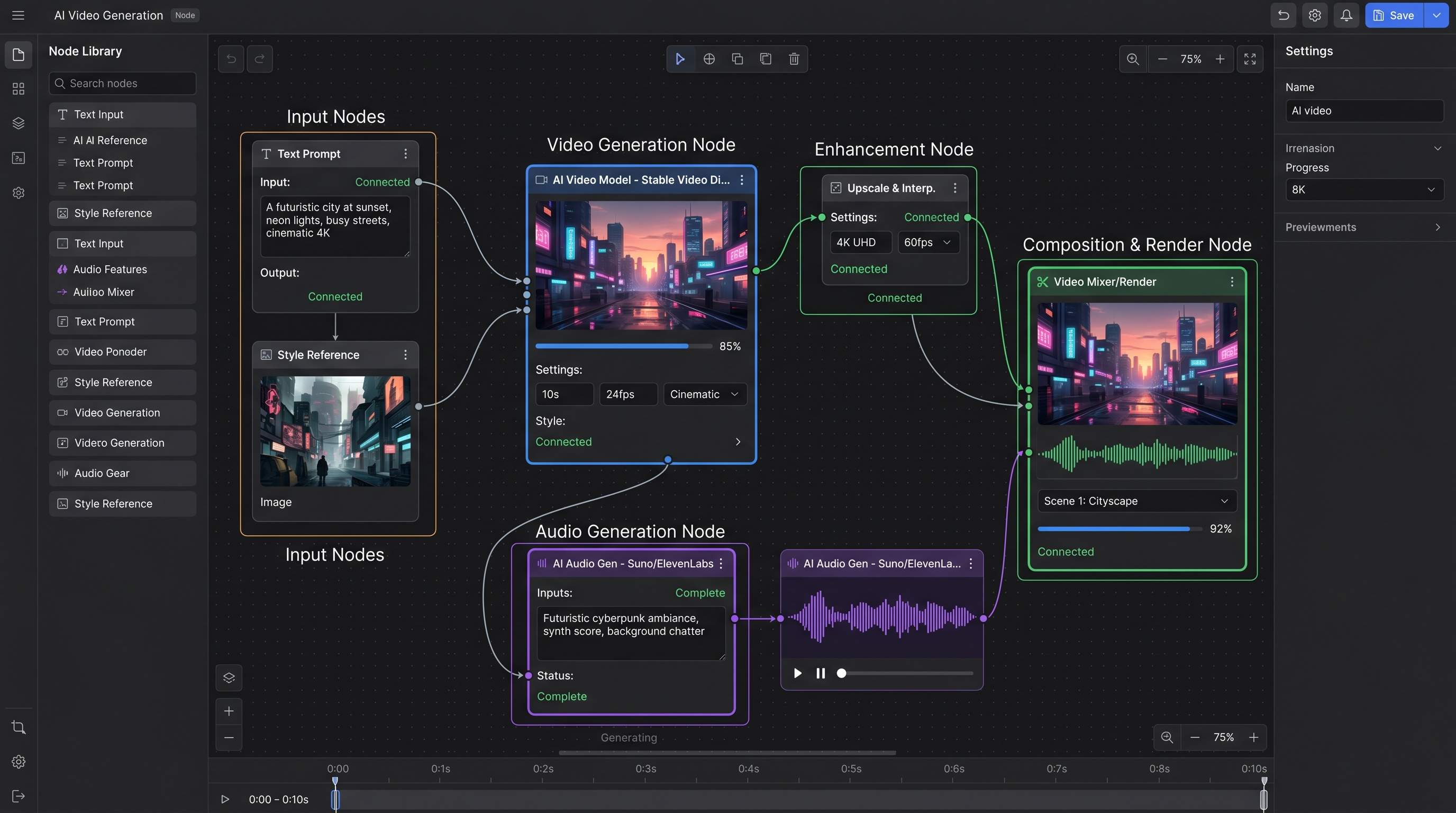
An AI video workflow is a directed graph of AI generation nodes where each node performs a specific transformation. A typical workflow takes a text prompt or interface form input, generates a keyframe image, animates that image into video, generates voice and music, and merges everything into a final render.
The Seven Node Types You Need
Most production workflows are built from seven node types. IMAGE nodes generate stills from text. EDIT nodes modify existing images. VIDEO nodes animate stills or generate video from text. VIDEO_LIPSYNC nodes sync speech to character lips. TTS nodes generate voice. MUSIC and SFX nodes generate audio beds. MERGE nodes combine everything into a final asset. Mastering these seven is 90 percent of the work.
Workflow Blueprint 1 UGC Ad
The UGC ad workflow takes three inputs: product image, script, and creator archetype. It generates a character keyframe with Flux Kontext, animates it with Veo 3.1 Fast, generates Hinglish or English voice with ElevenLabs, and merges to a 30 second vertical ad. Total run time is approximately 8 minutes.
Workflow Blueprint 2 Animated Short
The animated short workflow takes a story outline and produces a 60 to 90 second animated piece. Keyframes are generated in a consistent style using reference image anchoring, scenes are animated with Veo at nine by sixteen aspect ratio, and a voiceover plus ambient score are layered in. This workflow drives the Bhangarh Fort and Tenali Raman series for MinionArts.
Workflow Blueprint 3 Fashion Editorial
The fashion editorial workflow takes a model reference and five wardrobe descriptions and produces a six shot editorial sequence with consistent character identity across shots. Uses Flux for stills, reference image anchoring for character consistency, and Veo for motion.
Common Mistakes to Avoid
The top three mistakes are skipping the interface form layer which makes workflows unusable by non technical team members, using prompt fields on non prompt nodes which breaks the execution graph, and not setting aspect ratio consistently across nodes which causes expensive re renders.
How to Ship Your First Workflow in One Day
Pick one recurring task your team does weekly. Break it into five or fewer nodes. Define the interface form inputs a non technical user would need. Build it in Vertex or another canvas. Test with three real inputs. Ship to your team. Do not try to perfect it before launch.
FAQ
What is the difference between a workflow and a prompt?
A prompt is a single instruction to one model. A workflow is a graph of multiple model calls chained together with intermediate transformations.
How many nodes should a workflow have?
Most production workflows are four to eight nodes. Beyond ten nodes maintenance and failure rates increase sharply.
Can workflows be shared and remixed?
Yes, in canvases like MinionArts Vertex workflows can be exported as JSON, shared with teammates, and remixed by swapping out individual nodes.