AI documentary video production at scale is an architecture challenge. This post unpacks EDIT-node character locking, Veo 3.1 Fast prompts for camera consistency, and anti-dolly enforcement across six scenes.
The Scene Consistency Problem in AI Documentary Video Production
Producing a single AI video scene is relatively straightforward. Producing six scenes that feel like they belong to the same film is an entirely different challenge that stops most text to video documentary projects from reaching publication quality.
Without deliberate AI filmmaking workflow architecture, multi-scene AI documentary video production suffers from three failure modes:
1. Character drift — the protagonist looks like three different people across scenes
2. Camera inconsistency — a locked wide shot in scene one becomes a handheld close-up in scene three
3. Tonal fragmentation — lighting and color temperature shift without narrative reason
Solving these problems is not a Veo 3.1 Fast prompting challenge. It is a workflow architecture challenge.
EDIT Nodes: The Character Consistency AI Video Infrastructure
The EDIT node in Vertex is the backbone of character consistency AI video production. Before any VIDEO_GENERATOR node fires in your AI documentary video production pipeline, it receives a character reference image passed through an EDIT node that enforces visual identity parameters.
How it works: Your primary character image passes through the EDIT node where you define locked attributes — face structure, skin tone range, hair, clothing. Every VIDEO_GENERATOR downstream of this node uses this reference as a consistency anchor.
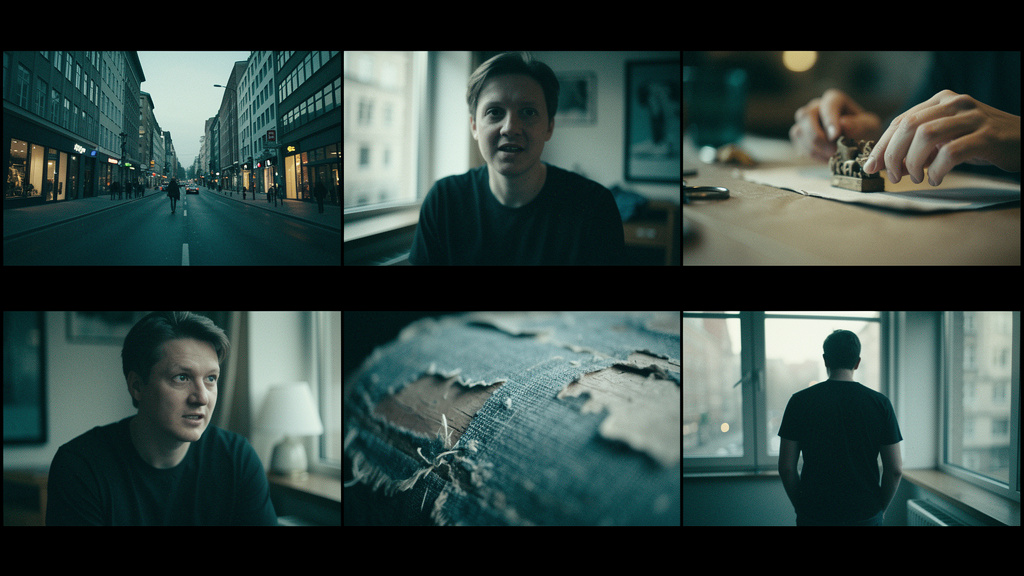
In practical terms, this is why your documentary subject looks like the same person in a wide establishing shot, a medium interview frame, and a close-up reaction shot. The EDIT node does the identity work so your Veo 3.1 Fast prompts do not have to carry that burden alone.
Camera Directive Architecture for AI Filmmaking Workflow
Documentary cinematography has a specific visual grammar: handheld energy in vox pop interviews, locked wide shots for establishing geography, slow push-ins for emotional moments. When building an AI filmmaking workflow, camera directives are set at the node level, not in the Interface Form.
Veo 3.1 Fast prompts for a six-scene text to video documentary:
| Scene | Directive |
|-------|-----------|
| 01 — Establish | Locked wide angle, static tripod, golden hour exterior, 16mm film emulation |
| 02 — Subject intro | Handheld medium shot, slight drift movement, interview framing, natural window light from right |
| 03 — B-roll action | Observational medium-close, follow with slight lag, documentary verite style |
| 04 — Detail | Macro close-up, static, shallow depth of field, ambient light only, slow zoom 0–3% over 6 seconds |
| 05 — Reaction | Close-up face, locked frame, minimal motion, candid expression |
| 06 — Resolution wide | Pull back to wide, slight crane simulation, cinematic grade |
Anti-Dolly Stacking: The AI Video Scene Consistency Rule That Saves Every Take
Rule: One camera movement directive per scene in any Veo 3.1 Fast prompt. Never combine "push in" and "dolly forward" in the same instruction. They stack and produce unnatural acceleration that breaks AI video scene consistency.
For Veo 3.1 Fast specifically, the model responds better to motion described through physics rather than cinematography jargon:
- Camera moves toward subject at walking pace — produces naturalistic results
- Dolly in 2x speed — over-interprets and creates jarring motion
Tonal Consistency Across AI Documentary Video Production
Color temperature drift across scenes is the visual equivalent of an inconsistent narrator voice. The fix is simple: repeat the lighting condition in every single Veo 3.1 Fast prompt across all six scenes.
Natural documentary lighting, 4200K color temperature, slight underexposure,
film grain at 15%, no color grading effects.
This repetition is not redundant. It is what keeps scene six feeling like it was shot on the same day as scene one.
Assembling the Six-Scene AI Filmmaking Workflow
Final assembly uses a sequential MERGE tree:
Scene 01 + Scene 02 → Merge A
Merge A + Scene 03 → Merge B
Merge B + Scene 04 → Merge C
Merge C + Scene 05 → Merge D
Merge D + Scene 06 → Merge E
Merge E + AUDIO (narration) → Final Output
This architecture gives you timing control at each join point. You can insert B-roll cutaways and adjust scene duration at the merge level without rebuilding any generation nodes.
The result is an AI documentary video production pipeline that holds together across its full runtime because AI video scene consistency was built into the architecture from the start.